
Ness
Maximizing your health savings account
Ness is a health and wellness focused rewards credit card where cardholders earn 5x points for purchases at healthy merchants and 2x points on purchases everywhere else.
The card comes with wellness related benefits, like access to a rewards marketplace, discounts on health coaching, and all the benefits that come with a Mastercard. The marketplace is full of wellness brands the company vets to ensure quality, brands like sweetgreen, Ora organics, On Running, and more.
Problem
Most people don’t know what a health savings account is let alone how to use it effectively and the benefits of having one. With the goal of improving our user’s physical health as well as financial health, Ness wanted to find a way for users to link an HSA account to the Ness app and easily pay off HSA eligible purchases, so they aren’t leaving their pre-tax funds on the table.
Scope
Company: Ness
Timeline: 2 weeks
Platform: IOS app
Tools: Figma, Adobe Photoshop
Team
My Role: Product Design, Digital Illustration
Head of Experience: Kenneth So
Collaborating Designer: Bao Lam
Product Manager: Jeremey Duvall
Engineers: Emel Topaloglu, Adrien Yvon
The Research Process
User interview
We learned that a handful of user’s were already linking their health savings account (HSA) to the Ness app to pay off specific transactions. This validated that users had a need, to use and possibly make the most of their HSA. The Ness team wanted to remove the effort a user takes to figure out which purchases are HSA eligible, by displaying them in the app & making it possible for users to pay them off.
Define what an HSA eligible transaction is
A health savings account is specifically for paying off qualified medical expenses, like health care, dental, and vision expenses. In order to ensure the purchases we flagged were HSA eligible, we only flagged transactions made at hospitals, doctor’s, or dentist’s offices.
Use cases
Introduce new “Pay with HSA” feature
link more than one account
View HSA eligible transactions
Define what an HSA eligible transaction is?
Select and pay off HSA eligible purchases, with HSA account
Confirm payment & View a payment from an HSA account
Select and pay off HSA eligible purchases, with HSA account ERRORs
Paying more than balance error
Paying from non HSA error
Viewing HSA eligible transactions in activity
The Design Process
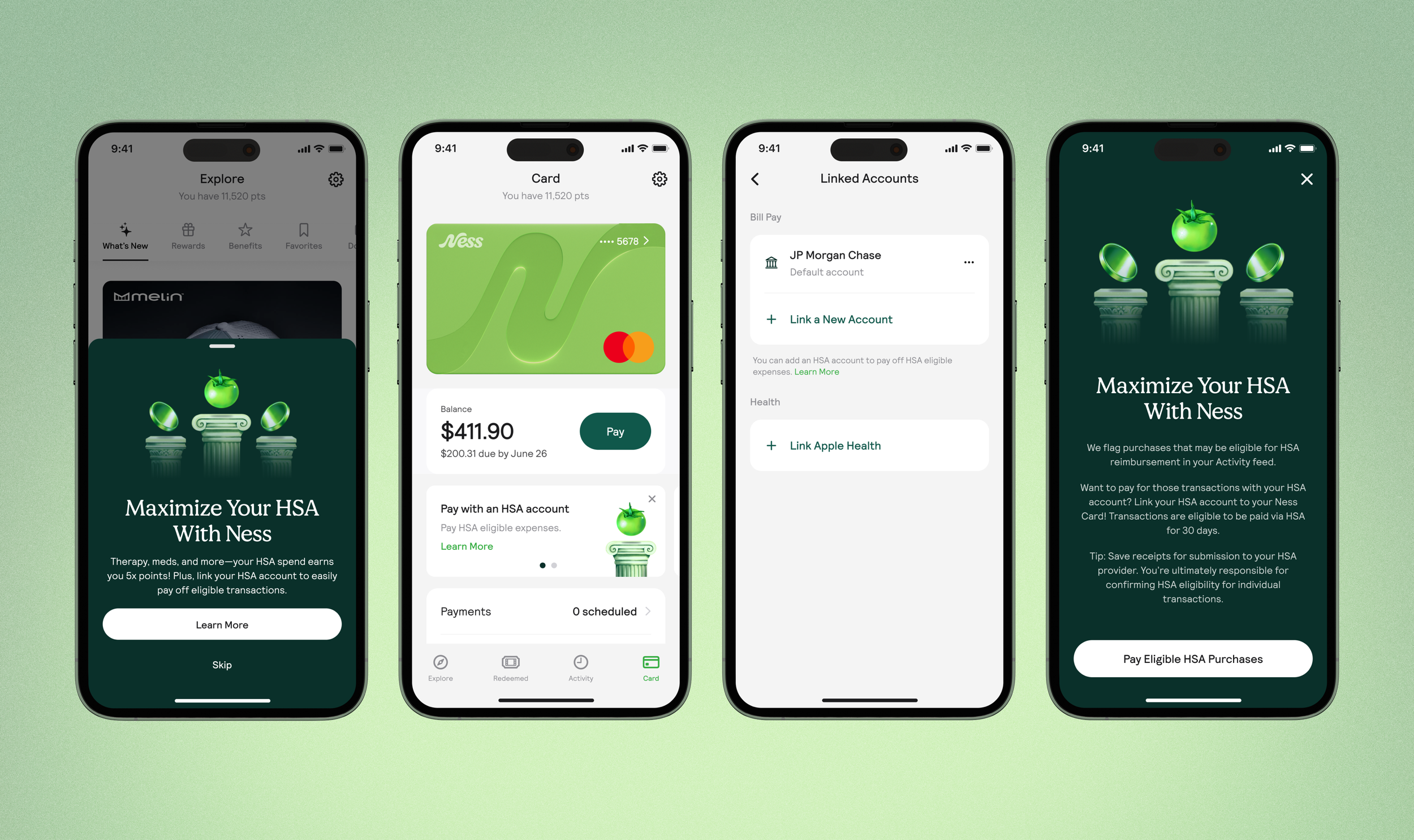
Use case: Introduce the new “Pay with HSA” feature
Most banking apps don’t have a “Pay with HSA” feature, therefore users may not know the value of their HSA account or how to use it in a banking app.
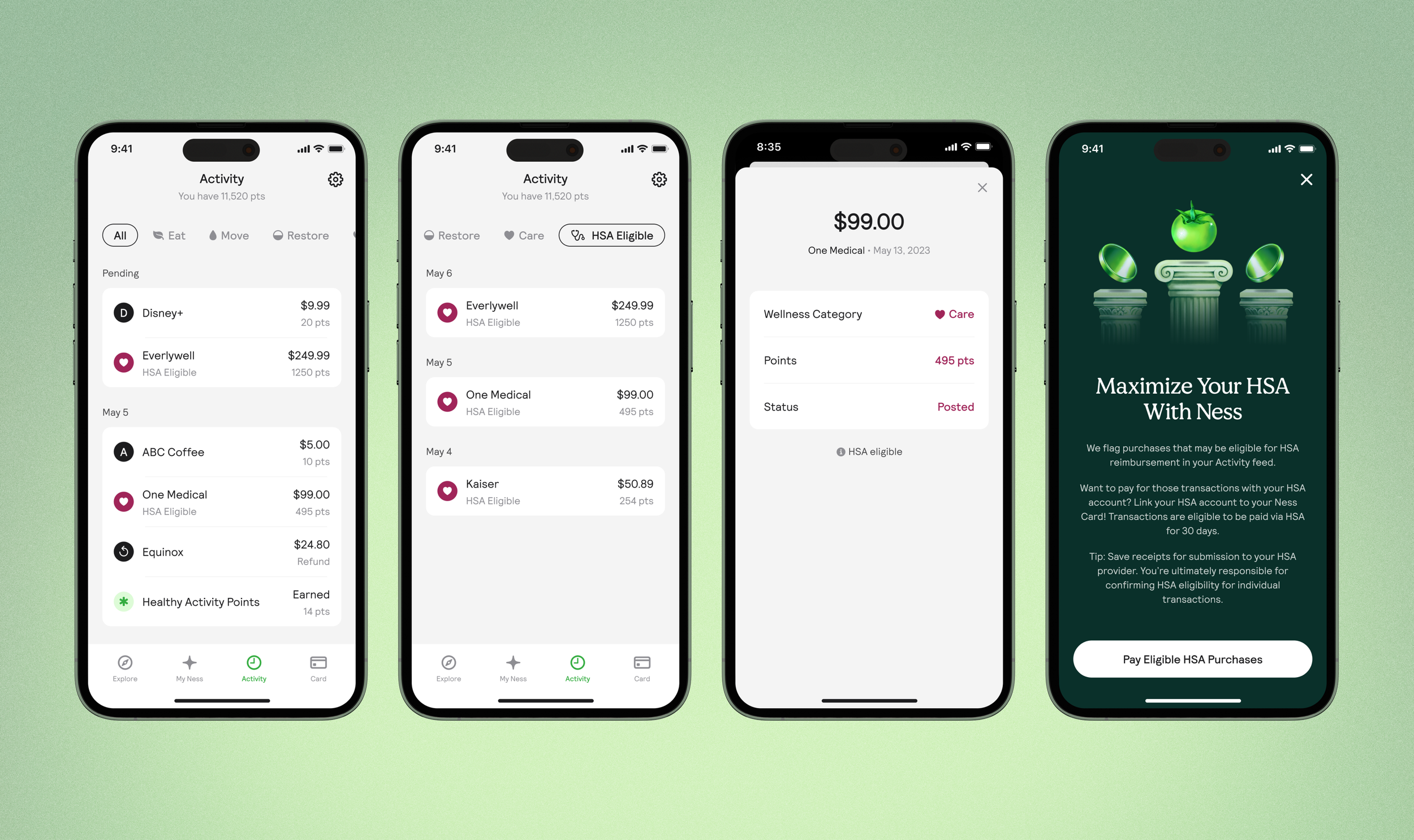
Solution: In app message, banner, educational copy, & modal
Because of this, educating users in a few different places, on how to use the new feature, it’s value, and in a visually appealing way, would be an important first step.
Even providing tips, so users can think ahead, saving receipts they may need to submit to the IRS. (The IRS requires that people keep receipts for all your Health Savings Account (HSA) spending.)

Use case: View HSA eligible transactions
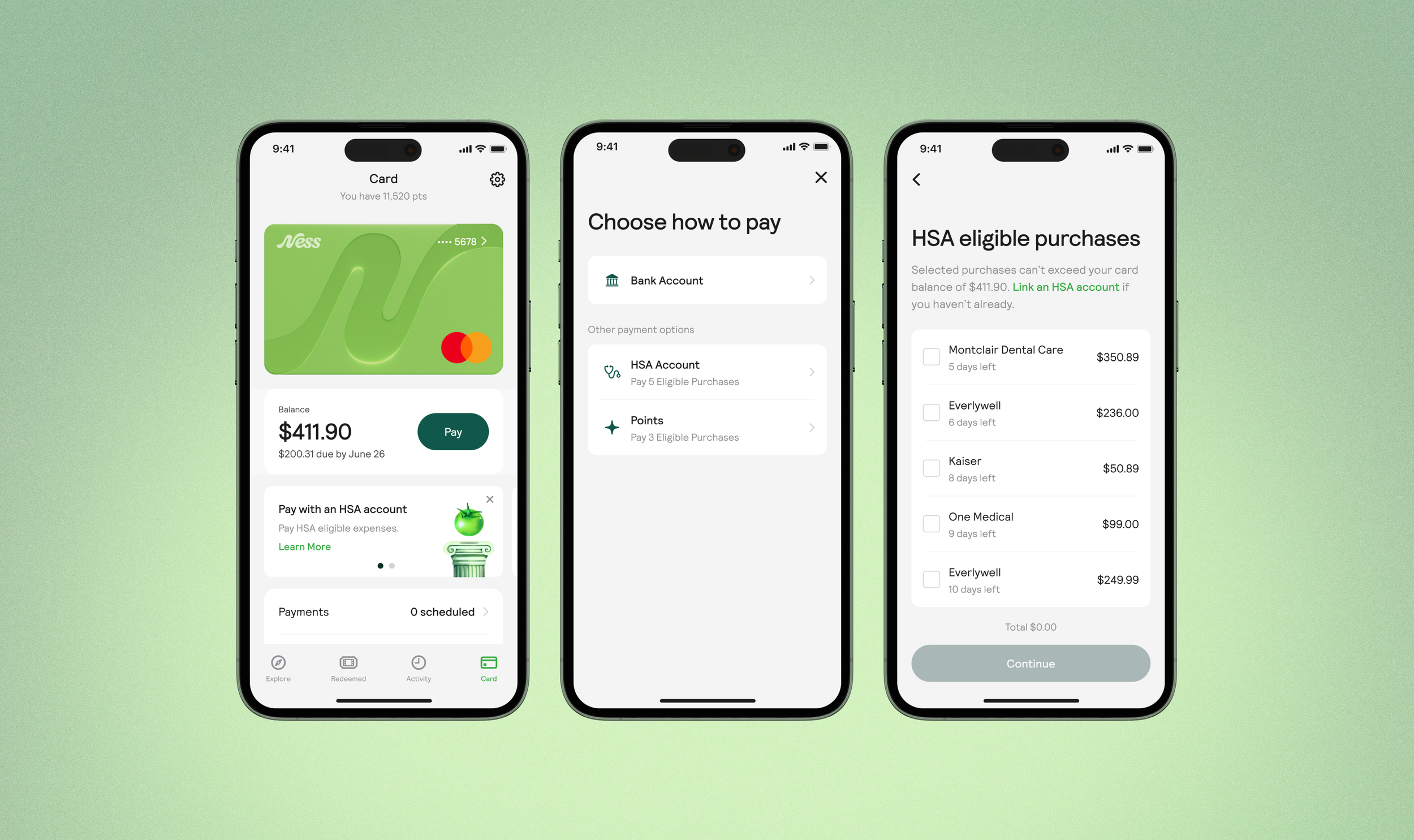
The Ness team wanted to remove the effort a user takes to figure out which purchases are HSA eligible, by displaying them in the app.
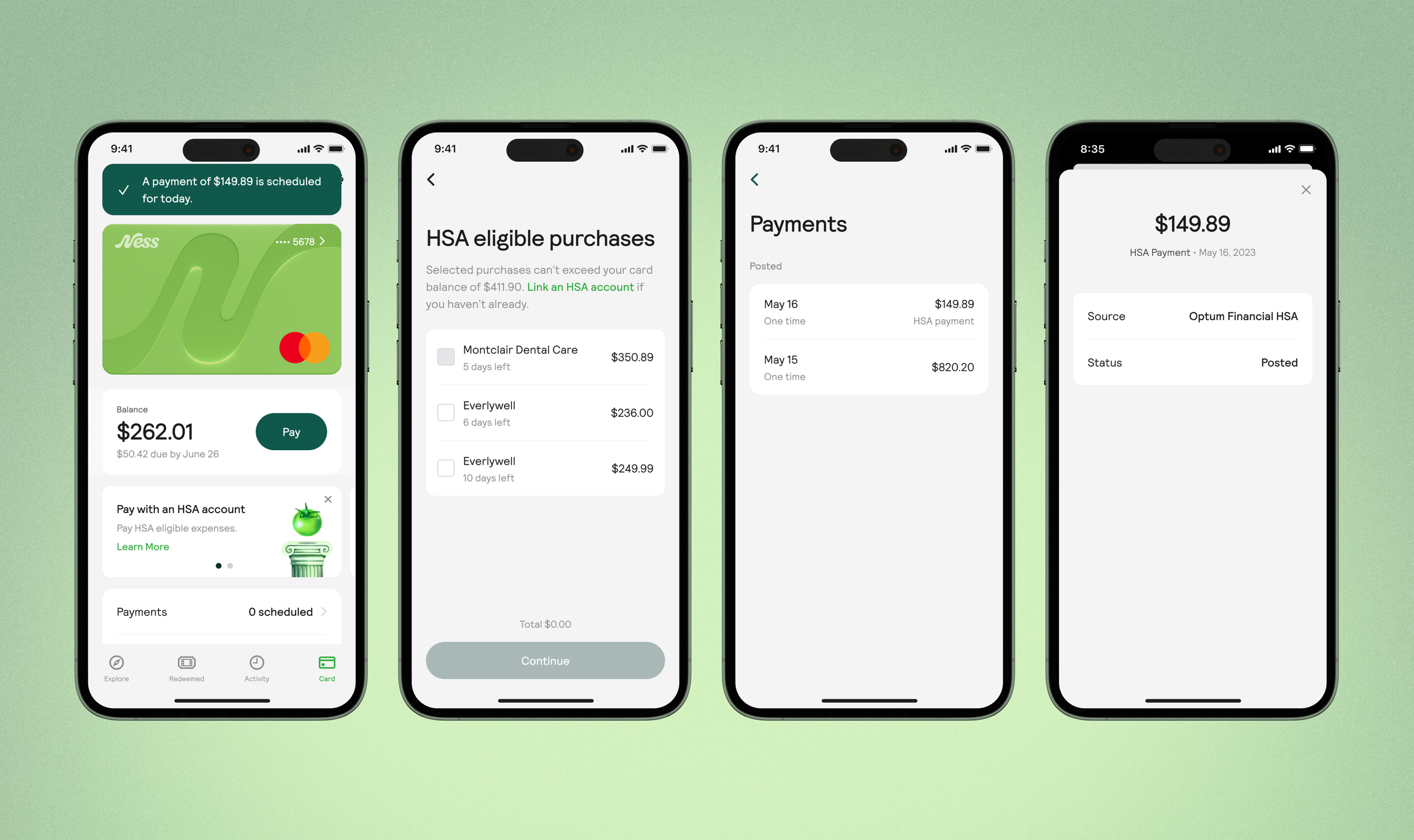
Solution: Users can select one or more purchases to pay off
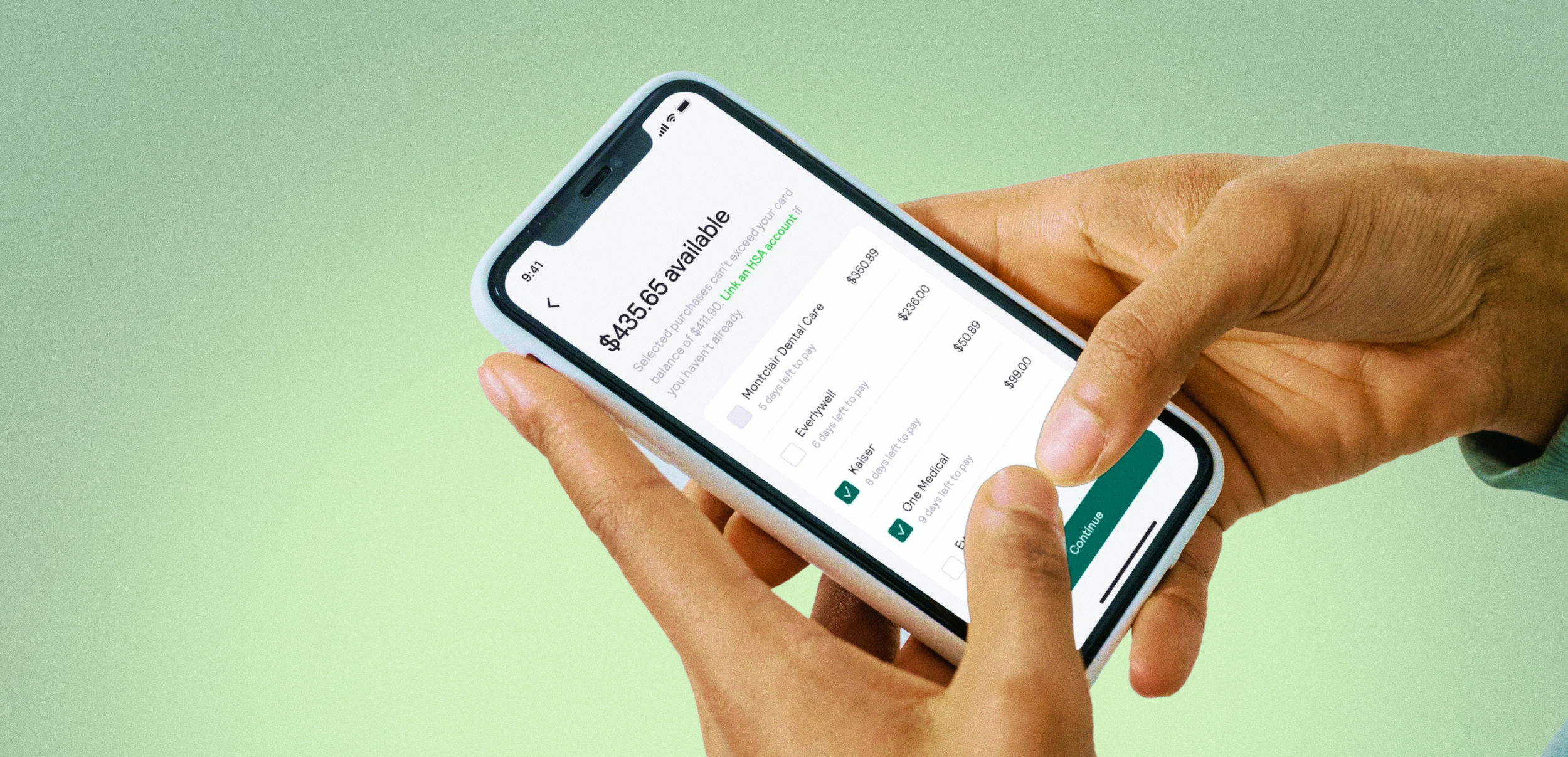
Making the journey of “pay with HSA” similar to the way a user makes a normal payment from a checking account, would help with way finding. Users can easily select HSA as a method of payment from the same pay button they use to make a normal payment.
Users can clearly view HSA eligible transactions as a list and link an HSA account if they haven’t already.
Use case: Select and pay off HSA eligible purchases with an HSA account
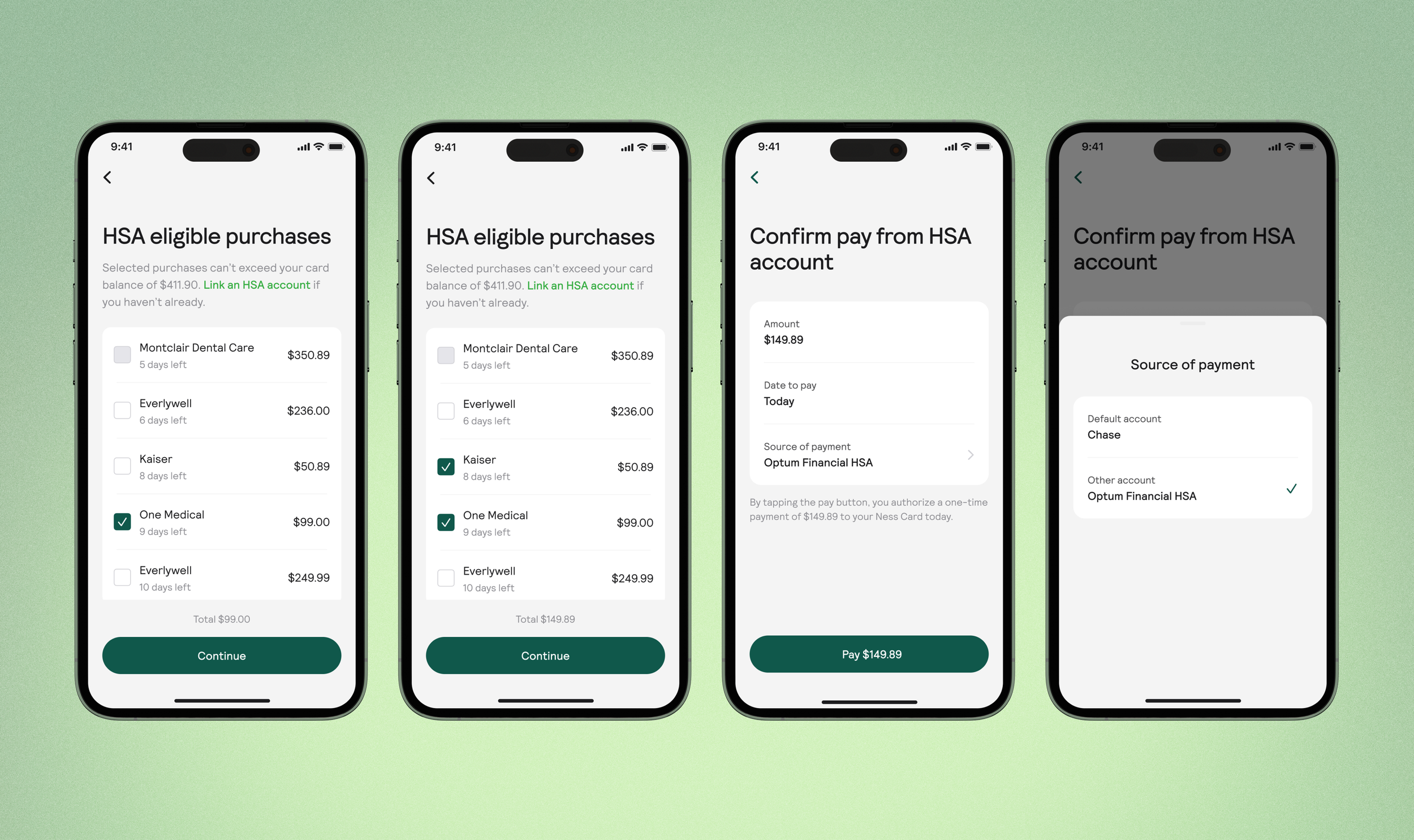
Solution: Check box selection and preventing overpaying
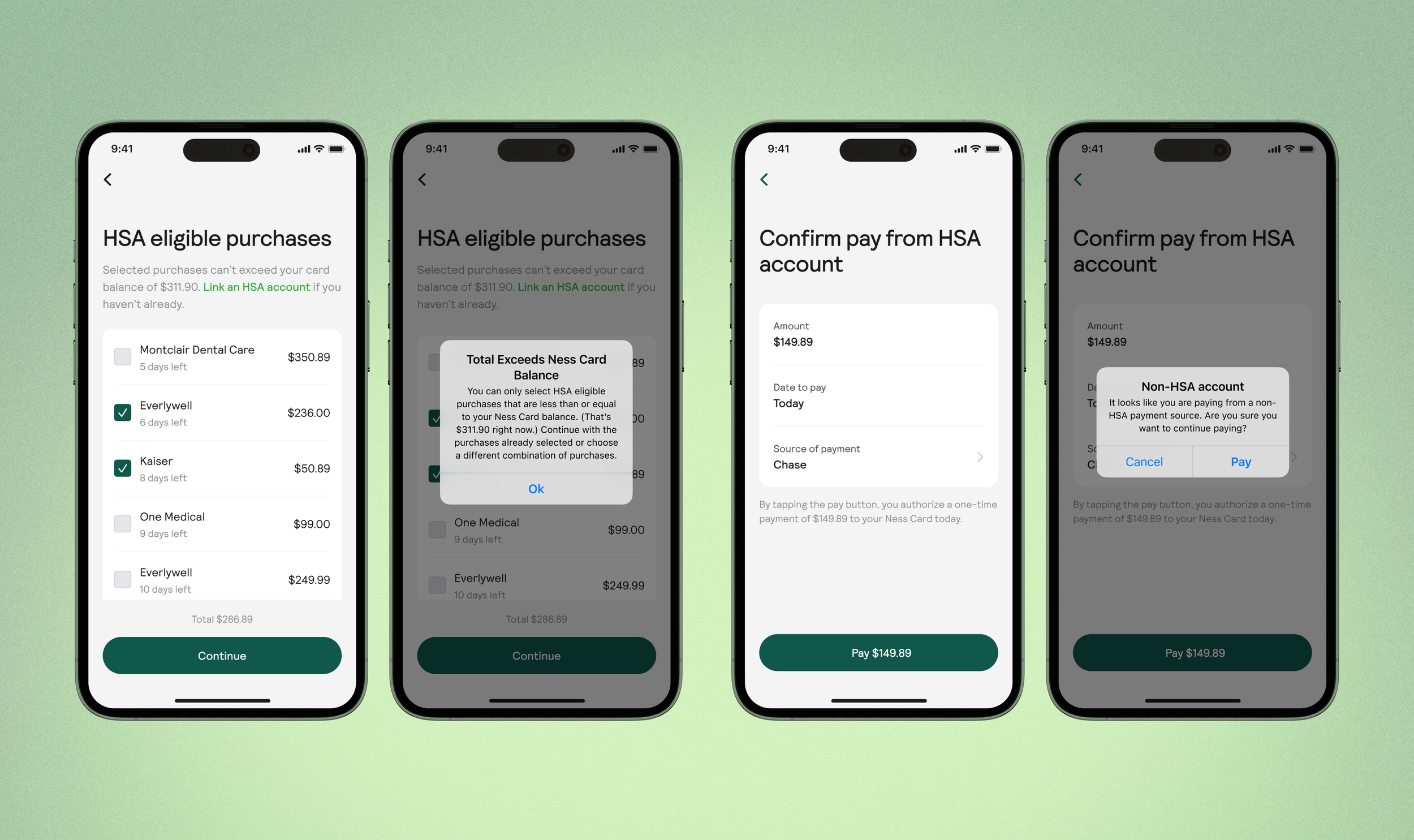
To prevent overpaying, we included the balance in the details copy for the user’s reference and disabled transactions that exceed the user’s card balance. User’s can double check their payment by viewing the total at the bottom of the screen.
The HSA account is set as their default payment source on the confirmation page, but users can still edit their payment source if they want to.
Use case: Payment completed
Solution: Toast
A user sees a confirmation toast and the transactions they paid for disappear, to confirm for the user that the payment has been made. Payments made from an HSA account are marked with a label, so that users can track the payment if they need to.
Use case: Help users keep track of HSA spending
Solution: HSA filter and label
We felt having a clear view of HSA eligible transactions in the user’s Activity tab gave them context and would help users keep track of their HSA spending.
Errors & edge cases
System modals were used to prevent users from overpaying, bringing their balance to a negative number and to inform users when they might accidentally pay from a non HSA account.
Reflections & Next Steps
Scoping designs to be built later
Because of the complexity of the feature, there were two ideas I was disappointed to lose, but got cut from the final design that went to the engineers. In the end, we decided to prioritize meeting our deadline, and save the designs for a later time.
The first was displaying transactions that got paid for from a user’s HSA account, to make it easier for them to gather receipts to submit to the IRS. The challenge was that payments could not be tied to specific transactions on the back end, so technically users are paying an amount they decide on, based on seeing the amounts from transactions we define as HSA eligible. We decided in the end, to make it clear to the user it was their responsibility to confirm HSA eligibility, even putting it in the “Learn more” copy.
The second was displaying how much was in a user’s health savings account. It was unclear whether or not we could pull this information, with our management software. Also, because we don’t show how much is in a user’s checking account, we decided it would be reasonable to expect users to know how much is in their health savings account, when they make a payment.